
Last updated: July 2026
Despite the rise of Microsoft Intune, Windows Autopilot and Azure Virtual Desktop, Windows golden images remain a core part of modern deployment engineering.
Over the last few years, there’s been a noticeable shift in how Windows devices are deployed. Microsoft’s investment in Windows Autopilot, Microsoft Intune, cloud provisioning and modern endpoint management has led many IT professionals to conclude that the era of the Windows golden image is over.
On the surface, that seems reasonable. Why spend time maintaining a custom image when a device can be shipped directly from the manufacturer, enrolled into Intune, and configured automatically from the cloud?
The reality is more nuanced.
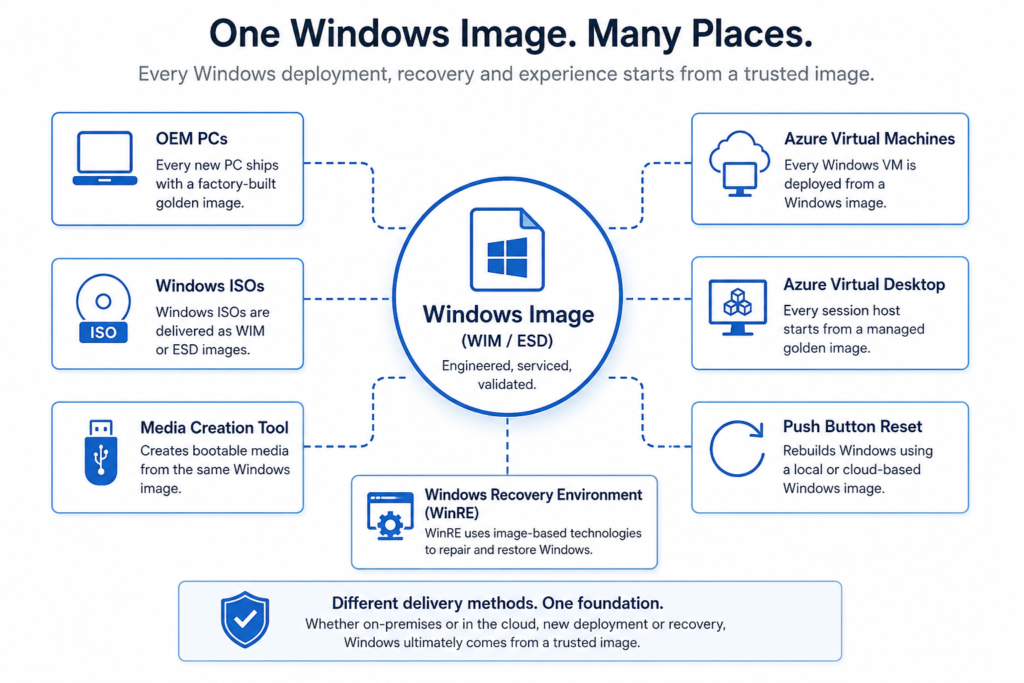
Golden images haven’t disappeared, they’ve simply found their proper place. In fact, Microsoft still relies on golden images throughout its own ecosystem. Every Windows release begins life as a Microsoft-engineered reference image, and every Windows ISO and Media Creation Tool download ultimately delivers that operating system as a WIM or ESD image. OEMs ship carefully engineered factory images on millions of PCs every year. Azure Virtual Desktop sessions are built from managed golden images. Even the Windows Recovery Environment uses image-based recovery options to restore a PC back to a known-good state.
The real question isn’t whether Windows golden images are obsolete. It’s whether you’re using them for the right workload.
For some organisations, a cloud-first deployment with Autopilot and Intune is exactly the right answer. For others, especially those rebuilding large numbers of devices, deploying Azure Virtual Desktop, supporting disconnected environments, or requiring consistent, repeatable engineering standards, a well-maintained golden image remains one of the most powerful tools available.
In this article, we’ll look at where golden images still fit in 2026, where they don’t, and why understanding the difference is more important than ever.
Before we look at the evidence, here’s the short version.
At a glance
01
Push Button Reset Still Depends on Image Engineering
Windows recovery has evolved over the years, with Microsoft adding features such as Cloud Download alongside the traditional local reinstall. However, both recovery methods are still fundamentally image-based.
A local reset rebuilds Windows using technologies already present on the device, including the Windows Recovery Environment (WinRE), the Component Store (WinSxS), migration components such as ScanState, and any ResetConfig.xml customisations provided by the manufacturer or IT administrator. Cloud Download simply retrieves a fresh Windows image from Microsoft instead of rebuilding from the local installation.
If the underlying Windows image has been engineered correctly, local recovery is fast and reliable. If it hasn’t, Reset often exposes servicing issues, missing components or broken recovery configurations.
Whether Windows is rebuilt from the local recovery image or downloaded from Microsoft’s cloud, recovery still relies on the same principle: restoring the operating system from a trusted Windows image. Image engineering hasn’t disappeared, it’s simply become part of the recovery process.
02
Azure Still Runs on Golden Images
Perhaps the strongest evidence that golden images remain relevant is Microsoft Azure itself.
Whether you’re deploying an Azure Virtual Desktop session host or a standalone Azure Virtual Machine, every Windows workload starts from a Windows image. Microsoft isn’t installing Windows from scratch each time, it’s deploying a pre-built, validated operating system image.
For smaller environments this might be a Managed Image, while larger organisations typically use Azure Compute Gallery. Compute Gallery provides image versioning, regional replication and controlled distribution, allowing IT teams to roll out new Windows builds in a predictable and repeatable way.
Before a new image version is published, it can be fully serviced, tested and validated to ensure Windows updates, Microsoft 365 Apps, security baselines and line-of-business applications all work as expected. Once approved, the image becomes the standard foundation for every new Azure deployment.
Whether the workload is a multi-session Azure Virtual Desktop environment or a standalone virtual machine, the engineering principles are identical. Start with a trusted image, validate it thoroughly, version it, then deploy it consistently.
The cloud hasn’t replaced golden images. It has simply changed where they’re stored and how they’re distributed.
03
OEMs Still Ship Golden Images
Every new Windows PC you buy arrives with a carefully engineered Windows image.
Whether it’s a Dell laptop, an HP workstation, a Lenovo ThinkPad or a Microsoft Surface device, none of them install Windows from scratch when they’re powered on for the first time. They all ship with a factory-built golden image that has been engineered, serviced, tested and validated before it ever reaches the customer.
Those images contain far more than just Windows. They typically include the latest cumulative updates, language packs, device drivers, firmware support, recovery partitions, custom branding, hardware-specific applications and any OEM customisations required for that particular device family.
Behind the scenes, OEMs follow a rigorous engineering process. Images are regularly rebuilt from clean Windows source media, serviced with the latest updates, validated across multiple hardware configurations and tested to ensure deployment, recovery and Windows Reset all function correctly before being released into manufacturing.
If golden images were obsolete, the world’s largest PC manufacturers wouldn’t rely on them to produce millions of devices every year. The reality is quite the opposite. Golden images remain the foundation of modern Windows manufacturing, they’ve simply become more sophisticated.
04
Autopilot and Intune Don’t Replace Images
One of the biggest misconceptions in modern endpoint management is that Windows Autopilot and Microsoft Intune have made golden images unnecessary.
They haven’t.
Autopilot is a provisioning technology. Intune is a management platform. Neither replaces the Windows image that the device starts from.
Imagine an employee’s laptop fails and they receive a replacement. The new device is enrolled into Autopilot, signs into Microsoft Entra ID, and Intune begins configuring it.
If every application has to be downloaded and installed from scratch, including Microsoft 365 Apps, Adobe Creative Cloud, Visual Studio, CAD software and other line-of-business applications, the rebuild can take hours. The user may be productive long before the device is fully configured, but the provisioning process is still consuming bandwidth, installation time and cloud resources.
Now imagine the same device starts from a company-managed Windows image.
Microsoft 365 Apps are already installed. Security baselines have already been applied. Core business applications are already present. The latest Windows updates are already integrated. Autopilot still enrols the device, Intune still applies policies, certificates and user-specific settings, but instead of building the device from zero, it finishes configuring an environment that is already 90% complete.
This is exactly why organisations continue to build and maintain Windows images for Azure Virtual Desktop and Azure Virtual Machines. The cloud management stack doesn’t replace the image, it complements it. A well-engineered base image reduces deployment time, improves consistency and gets users back to work faster while Autopilot and Intune deliver the final layer of configuration.
05
Lightweight Images Work Best with Intune
Another common misconception is that a golden image has to contain every application your organisation uses.
Modern image engineering focuses on building a clean, lightweight foundation rather than embedding every application into a single image.
A lightweight, fully serviced Windows image containing the latest Windows updates, Microsoft Defender platform updates, .NET updates, Microsoft 365 Apps (where appropriate) and any organisation-wide customisations provides a clean, predictable starting point without becoming difficult to maintain.
More importantly, every newly deployed device starts from the latest security baseline instead of spending hours or days downloading critical updates after first boot. Reducing the gap between deployment and full patch compliance helps minimise exposure to known vulnerabilities and ensures devices are protected from the moment they’re provisioned.
From there, Microsoft Intune can handle everything that changes over time, including device configuration, security policies, certificates, compliance settings, company applications and user-specific software.
This approach gives organisations the best of both worlds. Every device starts from a consistent, validated Windows build, while Intune continues to configure and manage the device throughout its lifecycle.
For organisations that regularly rebuild devices or deploy Azure Virtual Desktop session hosts, a lightweight base image significantly reduces deployment time without creating a bloated image that needs rebuilding every time an application changes.
06
Faster Disaster Recovery
Not every Windows problem can be fixed with troubleshooting. Sometimes the fastest and most reliable solution is to rebuild the device.
Without a managed image, that often means installing Windows, downloading updates, installing applications, applying security configurations and waiting for endpoint management tools to finish provisioning the device. Depending on the environment, that process can take hours.
With a well-maintained golden image, recovery is much simpler.
Deploy the image, boot the device, allow Autopilot and Intune to complete their final provisioning tasks, and the user is back to a familiar, fully configured environment in a fraction of the time.
This is one of the reasons many organisations continue to maintain standard Windows images. They provide a known-good starting point that dramatically reduces recovery time after hardware failures, operating system corruption or large-scale rebuilds.
When downtime matters, rebuilding from a validated image is often faster, more predictable and easier to support than starting from scratch every time.
07
Consistency Through Repeatability
One of the greatest strengths of a golden image is that every deployment starts from the same known good baseline.
Rather than relying on dozens of applications, scripts and policies to build a device over time, each machine begins with an identical operating system, application set and configuration. That consistency makes the entire environment easier to manage.
When every device starts from the same foundation, troubleshooting becomes more straightforward because engineers know exactly what the baseline should look like. Compliance is easier to demonstrate because every deployment follows the same validated build process. Auditing also becomes simpler, with fewer unknowns and less configuration drift between devices.
Modern management tools such as Intune continue to apply policies, security settings and user-specific configuration after deployment, but they do so on top of a consistent, repeatable Windows image. The result is a more predictable environment that is easier to support throughout the device lifecycle.
Whether you’re deploying ten devices or ten thousand, repeatability remains one of the biggest reasons organisations continue to invest in well-engineered golden images.
08
Offline and Secure Environments
Not every organisation has the luxury of a fast, unrestricted Internet connection.
Factories, hospitals, research laboratories, defence environments and other secure facilities often operate with limited connectivity, isolated networks or no Internet access at all. In these environments, cloud-first provisioning simply isn’t practical.
A golden image allows Windows, applications, drivers and updates to be delivered as a single, validated package without relying on Microsoft services or large application downloads during deployment. Once the operating system is installed, devices can be joined to the appropriate domain or management platform when connectivity becomes available, or remain entirely offline if required.
This approach also provides greater control over exactly what is deployed. Every application, driver and update can be tested and approved before the image is released, ensuring every machine starts from the same trusted baseline.
For organisations operating in disconnected or highly secure environments, golden images aren’t just relevant in 2026, they’re often the only practical deployment solution.
09
Large Applications Are Still Worth Imaging
Some applications are simply too large and time-consuming to install every time a device is rebuilt.
Development tools such as Visual Studio, engineering software like AutoCAD and creative suites such as Adobe Creative Cloud can take a significant amount of time to download, install and configure. This is particularly valuable for developer workstations, engineering desktops and specialist devices where the same software is required on every deployment. In some environments, these applications can add hours to a rebuild, particularly where Internet bandwidth is limited or multiple devices are being deployed at once.
For devices with a well-defined role, it often makes sense to include these core applications in the golden image. Developers can receive a fully configured development workstation. Engineers can start with all the tools they need. Designers can have Adobe Creative Cloud ready to use from the first sign-in.
Autopilot and Intune still provision the device, apply user-specific settings and install any remaining applications, but the heavy lifting has already been done. Instead of waiting for large software packages to download and install, users can become productive much sooner.
This isn’t about putting every application into your image. It’s about including the software that every device of a particular role is guaranteed to need, reducing deployment time while maintaining a consistent, repeatable starting point.
10
Windows Is Still an Image-Based Operating System
The biggest misconception surrounding golden images is that cloud deployment has somehow replaced imaging.
It hasn’t.
Whether Windows is installed from an ISO, deployed through Microsoft Configuration Manager, recovered using Push Button Reset, downloaded with Cloud Download, provisioned as an Azure Virtual Machine, deployed to Azure Virtual Desktop or shipped on a brand-new laptop, the operating system ultimately comes from a Windows image.
Windows itself is built around image technologies. WIM and ESD files package the operating system, DISM services and deploys those images, WinRE powers recovery, Push Button Reset rebuilds Windows from trusted sources, OEMs manufacture devices from engineered images, and Azure deploys virtual machines from versioned images.
The delivery method may have evolved, but the underlying technology has not.
Cloud provisioning, Windows Autopilot and Microsoft Intune have transformed how devices are enrolled, configured and managed. They haven’t changed the fact that every Windows deployment still begins with a trusted operating system image.
Golden images aren’t obsolete in 2026. They’re simply being used where they deliver the most value, providing a consistent, validated foundation that modern management tools build upon.
Final Thoughts
The idea that golden images are obsolete in 2026 comes from treating image engineering and device management as competing technologies.
They aren’t.
Golden images aren’t a replacement for Microsoft Intune, and Intune isn’t a replacement for golden images. They solve different problems. Used together, they create a deployment strategy that is both modern and repeatable.
A well-engineered Windows image provides a clean, consistent and fully validated operating system. Windows Autopilot provisions the device, and Intune applies policies, security settings, applications and user-specific configuration throughout its lifecycle.
The most mature organisations use both.
They start with a trusted Windows image, then use modern management to personalise, secure and maintain every device after deployment.
Windows deployment has evolved dramatically over the past decade, but one thing hasn’t changed. Whether it’s an OEM laptop, an Azure Virtual Desktop session host, an Azure Virtual Machine or a recovery image stored on a PC, Windows still begins life as an image.
The question isn’t whether golden images are still relevant. It’s whether you’re using them where they deliver the greatest value.
Need Help Building and Maintaining Windows Images?
Building and maintaining high-quality Windows images requires time, testing and a disciplined engineering process. If your organisation doesn’t have the resources to manage that internally, ArkDeploy can help.
ArkDeploy provides lightweight, fully serviced Windows images designed to work alongside Microsoft Intune, Windows Autopilot and Azure Virtual Desktop. Rather than replacing modern management, our images provide a clean, consistent and fully validated Windows foundation that’s ready for policy deployment, application management and ongoing servicing. Every image is built with the latest Windows security updates, Microsoft Defender platform updates and validated recovery components, giving every device a secure, fully serviced baseline from first boot.
Whether you need a standard enterprise image, an education build or a bespoke Windows image for your environment, ArkDeploy delivers Windows images built using the same engineering principles trusted by OEM manufacturers.

Leave a Reply